

Think about it: the invoice is the one message every customer opens. They check the amount, they save it, many of them look at it again later. Yet most bills are plain black-and-white tables with no logo, no offer and no reason to remember the shop.
Invoice branding changes that. Ping takes the PDF your billing software already creates and turns it into a branded document automatically, on every bill.
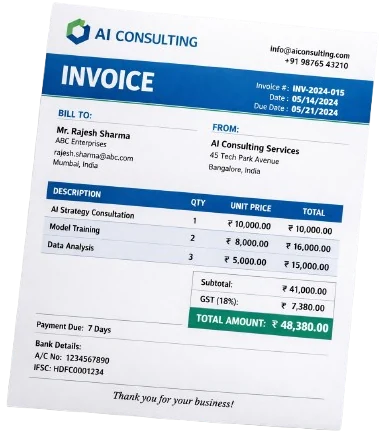 Before: a plain bill
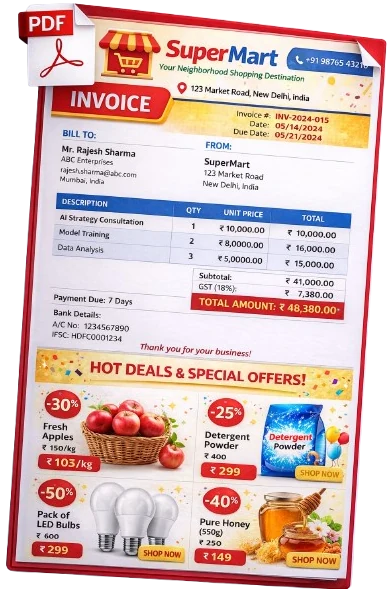 After: branded by Ping
What a branded invoice includes
Why it works
1. Every bill is a free ad
You already pay for printing, flyers or social media posts. A branded invoice reaches every paying customer, at the moment they're most engaged, at no extra cost per message.
2. Offers sell the next visit
"10% off on dry fruits till Diwali" on today's bill is a reason to come back next week. Rotate offers by season, festival or slow-moving stock.
3. Professional bills build trust
A clean, branded invoice tells customers you're an organised, serious business, which matters for credit customers, B2B buyers and new customers alike.
See your own bill, branded
Send us one of your bills and we'll show you how it looks with your logo and offers.
Ideas for your offer page
- Festival offers: Diwali, Holi, Eid, wedding season.
- Combo deals: "Buy 5kg rice + 1L oil, save ₹50".
- New arrivals: show 3 to 6 products with photos and prices.
- Loyalty nudges: "Show this bill on your next visit for 5% off".
- Clear stock: move slow items with a limited-time price.
Change the offer every two to four weeks. A fresh offer keeps customers looking at your bills instead of skipping past them.
How to set it up in Ping
Invoice branding is included in the Royal and Crown plans. Your bills are going out anyway. Let each one sell for you.
See Ping on your own bills
Book a free demo. Our team installs Ping on your billing PC and links your WhatsApp.
 Bill saved